How to manage Sync Issues Folders when using Outlook Exchange
Topic T1049
Applies to NEO (Std) 3 and NEO Pro 3
Background This topic relates only to users of Exchange Server when using with an Offline store (OST) with or without Cached Exchange Mode enabled.
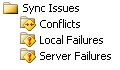
The Outlook Sync Issues folders contain information relating to Outlook's synchronization of Exchange Mailboxes and Outlook offline stores. Note that this does not refer in any way to NEO's synchronization with Outlook stores. These folders are special folders automatically created by Outlook. They appear as follows in the Outlook Folder List (Outlook 2003) when synchronization events occur:
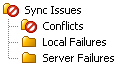
How Sync Folders and their messages appear in NEO Since these are Outlook folders, they also appear in NEO's Outlook View:
Why do the sync messages appear in Active Mail?
In Outlook you may not have noticed these because they don’t appear in the Inbox. However, in NEO, since all incoming messages are shown in Active Mail, Today etc. regardless of their Outlook folder home, they become visible as duplicate messages.
How to prevent the messages from appearing in Active Mail and other NEO folders
Mark the Sync Issues folders as 'Not organized in NEO folders' by taking the following steps:
Go within NEO to the Outlook Folder Tab
Locate and right-click the Conflicts folder
Choose the Folder Properties item at the bottom of the shortcut menu
Check the box for "Folder is not organized into NEO folders'