Error messages received indicating that your email is improperly configured
Topic T1140
Applies to All NEO products
Problem Outlook or NEO reports that there are problems with the e-mail configuration on your system.
Error Messages like:
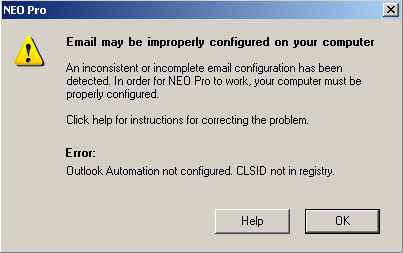
- Email may be improperly configured on your computer
- Outlook automation not configured. CLSID not in registry.
Solution
Most common cause for this problem is wrong bitness between NEO and Outlook.
NEO Pro 5 and NEO Find 1 are only available for 32 bit Outlook.
Starting NEO Pro 6 and NEO Find 3 both programs are available for 32 bit and 64 bit Outlook.
So first make sure you are running the latest NEO Pro/Find version (check in NEO under Help, About).
Now check the exact error text as it most likely will indicate the bitness conflict between NEO and the Outlook version you are running: either 64 bit NEO with 32 bit Outlook or 32 bit NEO with 64 bit Outlook - the error message will indicate these details.
When incorrect bitness is the issue, uninstall the current NEO Pro/Find, download the version matching the bitness of your Outlook client and reinstall your NEO product.
You can download the latest NEO Pro here: www.caelo.com/products/download_neopro.php
You can download the latest NEO Find here: www.caelo.com/products/download_neofind.php
Click here for instructions to check bitness of Outlook.
NOTE: Please note the bitness of Outlook is independent of the bitness of your Operating System (which in most cases will be 64 bit while default Outlook version is 32 bit).
If this doesn't apply to your situation or error message, please proceed with the below.
Description In order for NEO to operate properly there are a number of configuration and setup conditions that must be met. There are a number of error reports that the user may receive when these minimum conditions are not met. The following describes two of the main issues with the e-mail environment configuration that yields serious error reports:
A necessary registry key has not been set preventing NEO from identifying the proper email configuration.
The E-mail program (client) is incorrectly set and is not set as Outlook.
The Outlook environment has serious installation / configuration flaws.
Resolution #1
To resolve do the following:
Browse to the "C:\Program Files (x86)\NEO Pro" or "C:\Program Files (x86)\NEO Find" directory containing your NEO product
Right-click NeoPro.exe or NeoFind.exe and select Run as Administrator
This allows NEO to set the correct registry key.
After this you should be able to run NEO normally again.
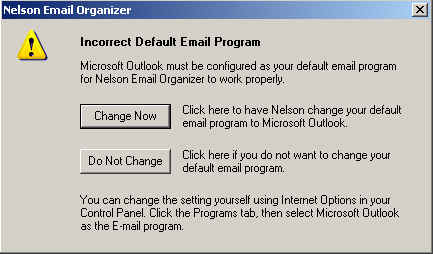
Resolution #2 When Outlook is not set as the default e-mail client, the user will receive the following error when starting NEO:
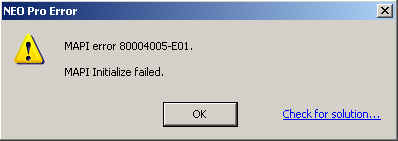
In addition, the user may receive the following two messages in conjunction with the same error condition:
To correct this fault you can do one of two things:
In the 'Incorrect Default E-mail Program' dialog above, click the 'Change Now' button to switch Outlook to become the default e-mail client. In some instances setting the default e-mail client in this way will result in NEO issuing another '80004005-E01' error dialog. If this occurs, NEO will be unable to open and will close. Simply restart NEO and it should start properly.
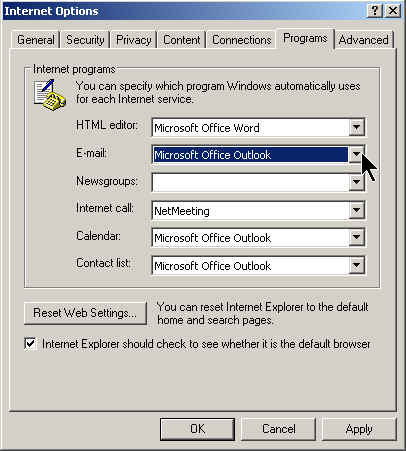
You can choose to do this manually via Internet Explorer (IE). To accomplish this do the following:
Start Internet Explorer
Select 'Tools | Internet Options | Programs tab'
Under 'Internet Programs', E-mail:, click the dropdown menu button and from the dropdown list select Outlook as the default email client.
Resolution #3 In certain instances, due to problems with the Windows registry or missing Windows registry keys (CLSID), the Outlook environment is incorrectly installed, initialized or configured yielding the following error message: